
How it works
We help you get set up, trained and ready to go.
Start with pre-made templates, get help setting up your assets and give your team practical training. Less to build from scratch, with support once you’re live.
Book a demoGetting started
A clear route from setup to everyday use .
We’ll work through the setup with you, around the work your business does and the people who do it.
-
Start with how you work.
We’ll talk through the jobs you handle and how your office and engineers work, so the setup reflects your business.
-
Set up your assets and templates.
We’ll help configure your asset types and service templates. Our pre-made templates give you a starting point, so setup is usually a matter of adjusting them to your specific requirements.
-
Train your team.
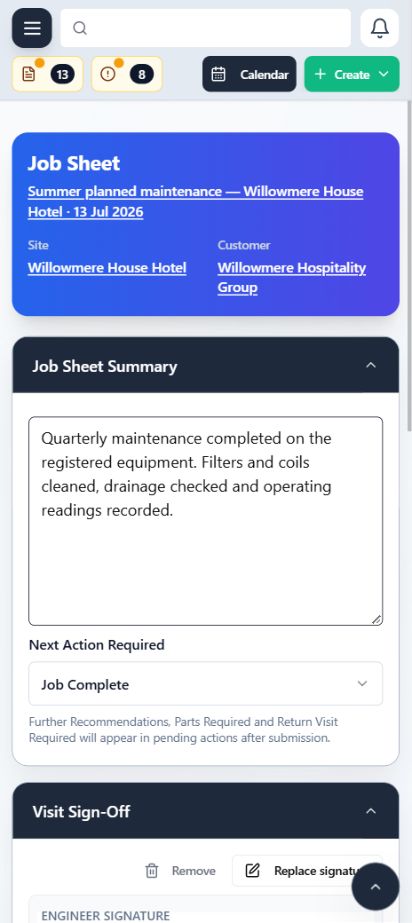
We’ll show your office staff and engineers how to use ClimaticFlow for their day-to-day work, from scheduling visits to completing job sheets on site.
-
Get you live.
Once the setup and training are complete, we’ll help your team start using ClimaticFlow for your jobs and maintenance visits.
-
Support you as you go.
Support continues after you go live. We’re here to answer questions and help you get the most from ClimaticFlow as your team uses it.
On your phone
Take ClimaticFlow out on site .
Install ClimaticFlow on your phone’s home screen and use it as a mobile app. Engineers can open their visits, check job details and complete job sheets from their phone.
We’ll help your team get mobile access set up as part of your training.
See how ClimaticFlow fits your business.
We’ll show you how it works using the jobs and maintenance visits your team handles.
Book a demo